

Are you just starting Super Bear Adventure and feeling a little confused about what to do first? Don’t worry, this happens to almost every new player. The game has a lot of moves, worlds, and missions, and it can feel like a lot at the start.
The good news is that once you understand the basics, the game becomes super easy and fun to play. In this guide, we will explain everything step by step, from the simple controls to the advanced moves that pro players use. By the end, you will know exactly how to play Super Bear Adventure like an expert.
If you want to skip the grind completely and start with everything unlocked, you can also try the Super Bear Adventure MOD APK,which gives you unlimited coins and unlocked items right from the beginning.
What is Super Bear Adventure?
Super Bear Adventure is a 3D platformer game made by Earthkwak Games. You play as Baaren, a brave little bear who runs, jumps, climbs, and explores big, colorful worlds. Your main goal is to rescue your bear friends, collect coins, find hidden stickers, and defeat bosses in every world.
The game might look simple at first, but it actually has a lot of depth. There are dozens of moves you can learn, from basic jumping to advanced combos that speedrunners use to finish levels super fast. Moreover, there are some SBA settings that you should look out for.
Where Do I Start? The Hub Explained
When you open the game for the first time, you will land in a place called the Hub, sometimes also called Bear Village. Think of the Hub as your home base. It connects to every world in the game.
In the Hub, you can:
- Talk to NPCs to get hints and tips
- Open portals (gates) that lead to different worlds
- Visit the shop to buy hats and skins using coins
- Practice your jumping, rolling, and basic moves safely
Before jumping into your first real world, it is a good idea to spend a few minutes in the Hub. Practice moving around, jumping, and getting comfortable with the controls. There is no rush here, and no enemies to bother you.
Once you feel ready, look for the Turtletown portal. This is the first world you can enter, and it is designed especially for beginners.
Basic Controls in Super Bear Adventure
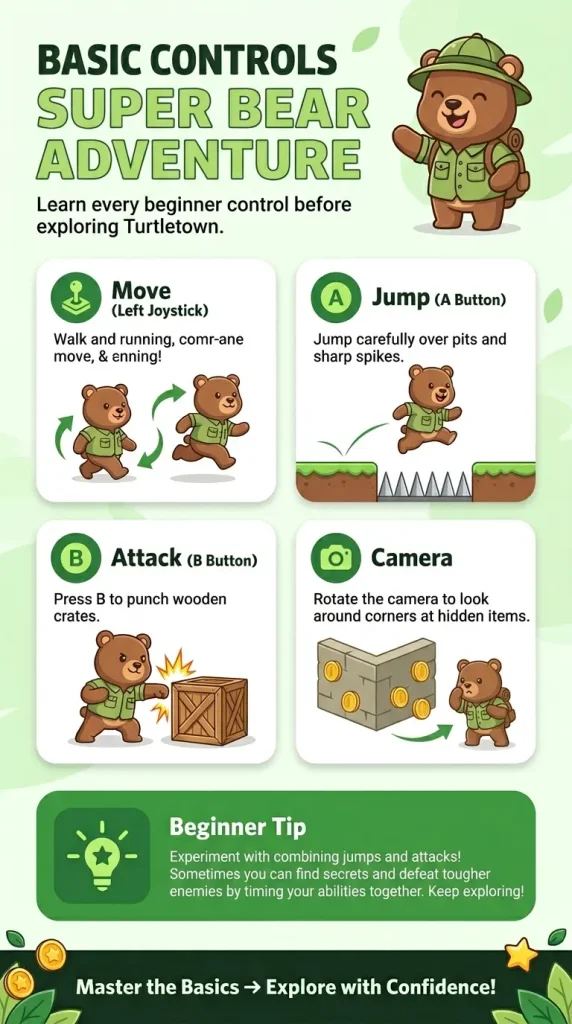
The controls in Super Bear Adventure look very simple, but they actually let you do a lot of cool things. On mobile, you use a joystick on the left side and two buttons, A and B, on the right side. On PC, you use a keyboard and mouse, or you can connect a controller. On Nintendo Switch, the buttons are arranged a little differently, but they work the same way.
Here are the most basic controls every beginner needs to know:
Move (Left Joystick) This is the most important control in the whole game. Push the joystick gently and Baaren will walk slowly, which helps with small, careful movements. Push it all the way and Baaren will run at full speed, which helps when jumping far or running from enemies.
Jump (A Button) The second most important move. Use it to jump over obstacles, land on enemies, cross gaps, and reach higher platforms. You can also move left and right while in the air.
Attack (B Button) Used to punch enemies, open cages, and break crates or fences. It is the basic way to fight back when something is in your way.
Camera Swipe the screen (on mobile) or move your mouse/right stick (on PC and controller) to look around. This helps you spot hidden coins, stickers, and platforms you might miss otherwise.
Spend some time in the Hub trying out these basic moves before heading into Turtletown. It makes a huge difference once you start exploring real levels.
All Platforming Moves Explained Simply
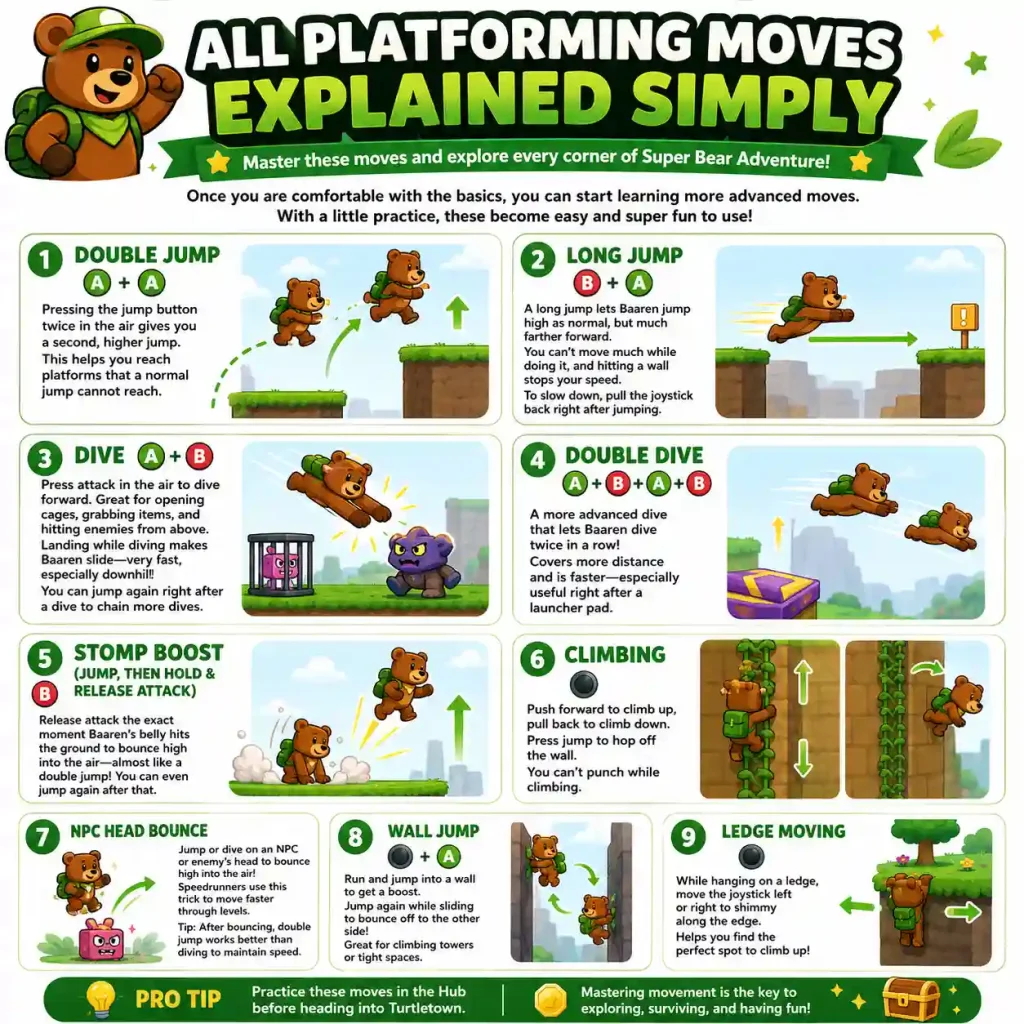
Once you are comfortable with the basics, you can start learning more advanced moves. These might sound complicated at first, but with a little practice, they become very easy and even fun to use. You can find a detailed guide to flying at SBA.
Double Jump (A + A)
Pressing the jump button twice in the air gives you a second, higher jump. This helps you reach platforms that a normal jump cannot reach. It is one of the first advanced moves every player should learn.
Long Jump (B + A)
A long jump lets Baaren jump just as high as normal, but much farther forward in a straight line. The only downside is that you cannot move much while doing it, and if you hit a wall, you will lose your speed. To slow down after a long jump, pull the joystick backward right after jumping, almost like hitting the brakes.
Dive (A + B)
While in the air, pressing the attack button makes Baaren dive forward. This move is great for opening cages, grabbing items, and hitting enemies from above. If Baaren lands while diving, he slides on the ground, and this slide can be very fast, especially going downhill. You can even jump again right after a dive and dive once more, creating a chain of dives that keeps you moving quickly.
Double Dive (A + B + A + B)
This is a more advanced version of the dive. It lets Baaren dive twice in a row, covering even more distance and moving faster than a regular dive. It works especially well right after using a launcher pad.
Stomp Boost (Jump, then Hold and Release Attack)
This move is a little tricky to learn, but very rewarding once you get it. If you release the attack button at the exact moment Baaren’s belly hits the ground, he bounces back up almost as high as a double jump, and you can even jump again afterward. This is one of the best moves for quickly gaining height.
Climbing
In certain areas like Bear Village, Turtletown, and Snow Valley, you will see vines or rocky walls. Push the joystick forward to climb up, and pull it back to climb down. Press the jump button to hop off the wall whenever you want. Just remember, you cannot punch while climbing.
NPC Head Bounce
Here is a fun trick that many players don’t know about at first. If you jump or dive onto the head of an NPC or an enemy, you will bounce up into the air. This is actually a useful trick used by speedrunners to move through levels faster. Just be careful, diving right after a bounce will slow you down, so a regular double jump works better if you want to keep your speed.
Wall Jump
If you run and jump directly into a wall, Baaren will pause for a moment and get a small height boost before sliding down. If you press the jump button while sliding, Baaren will jump off the wall and onto the opposite side. This is especially useful in towers or narrow spaces with walls on both sides, since you can bounce back and forth to climb very high.
Ledge Moving
If you are hanging onto the edge of a platform, you can move slowly left or right along the ledge. This helps you find a good spot to climb up safely.
Attacking Moves
Punch (B Button)
This is your standard attack. It is simple and works fine for most situations, like hurting enemies, opening cages, or grabbing stone blocks. You can also use it to push movable objects like soccer balls around the world.
Belly Stomp (Jump + Hold Attack)
This move makes Baaren slam his belly onto the ground. It is great for hitting multiple enemies at once and works especially well during boss fights. You can let go of the attack button early while still in the air to cancel the stomp if you change your mind.
Water Moves
Super Bear Adventure also has special controls for swimming, found in places like Bear Village, Turtletown, Beemothep Desert, and Giant House.
Swimming: Use the joystick to swim. Pushing gently makes you swim slowly, while pushing fully makes you swim fast.
Jumping from Water: Press the jump button while at the water’s surface to leap out. After landing back in the water, you have to wait a couple of seconds before jumping again, unless you stay still.
Diving Underwater: Press the attack button at the surface to sink slowly, or do a belly stomp from above to sink quickly with force.
Swimming Up: Press the jump button to swim upward. This is important because Baaren naturally sinks until he touches the bottom.
Vehicle Controls
Some levels let you drive vehicles, which completely change the way you control Baaren.
Quad Bike: Instead of the joystick, you get a gas button to go forward and a brake button to slow down or reverse. Left and right buttons steer the bike. If you are flying through the air at high speed, you can press the exit button to launch Baaren off the bike.
Paper Plane: Found in the Giant House and some daily missions. Push the joystick down to speed up and pull it up to gain height. You can jump off the plane at any time by pressing either the jump or attack button.
Go-Kart: Works very similarly to the quad bike, just with a different design and the same speed boost trick.
Environmental Effects You Should Know About
Different surfaces in the game change how Baaren moves, so it helps to understand them early on.
Ice: Found in Snow Valley and a few icy spots elsewhere. Running becomes slippery, and sliding lasts much longer. To stay fast and in control, try doing single jumps in a row, or use long jumps, since your jumping speed carries over into your sliding speed.
Purple Honey: This sticky substance appears in every world. Stepping into it slows Baaren down a lot, making him an easy target for enemies. The fastest way to escape it is to jump out as quickly as possible.
Water: Normally, water slows you down. But if you dive deep underwater instead of just swimming on the surface, you actually get a nice speed boost.
What Should I Do in Each World?
Every world in Super Bear Adventure follows a similar pattern, which makes it easy to know what to focus on once you arrive.
1. Rescue the Trapped Bears: Look for cages around the world. Break them open or solve small puzzles to free the bears trapped inside.
2. Collect Purple Coins: Coins are scattered everywhere, on the ground, inside crates, and hidden in secret spots. You use these coins to buy hats, skins, and other items from the shop.
3. Find Secret Stickers: Each world has hidden stickers tucked away in clever spots. Finding all of them is needed if you want to reach 100% completion in the game.
4. Defeat the World Boss: Every world ends with a boss fight. Learn to dodge their attacks and use your ground-pound or belly stomp to deal damage and win.
Once you finish a world, a new one opens up. After Turtletown, you can move on to other SBA locations like Snow Valley, Beemothep Desert, Giant House, The Hive, and the Mole Mines. If you are using the MOD APK version, all of these gates are already unlocked, so you can explore them in any order you like.
There is also the Arcade World, a separate area filled with mini-games like Hoops Master and Retro Racer, along with daily challenges that refresh every day and give you extra coins and rewards.
Using a Controller
If you prefer playing with a controller instead of touch controls or a keyboard, Super Bear Adventure fully supports it. Both Xbox-style and PlayStation-style controllers work well with the game.
The left joystick or D-pad moves Baaren around, while the right joystick controls the camera. The bottom face button works as your jump button, and the right face button works as your attack button. If you are driving a vehicle, the triggers control acceleration and braking.
You can also change these button settings inside the pause menu if you want a different layout that feels more comfortable to you.
Tips to Get Better at Platforming
Here are some simple tips that will help you improve quickly:
Combine Roll and Jump: Build up some speed first, then jump right after. This helps you reach platforms that are far away.
Try a Crouch Jump: Crouching for just a moment right before jumping gives you a small height boost. This comes in handy in tight spaces.
Practice Wall Jumps: Find a narrow area with walls on both sides, like the tower in Turtletown, and practice jumping back and forth to climb upward.
Use Ground Pound on Bosses: Save your belly stomp and ground pound moves for boss fights. They deal a lot more damage than a regular punch.
Take Your Time Exploring: Don’t rush through levels. Take a moment to look around corners and behind objects, since coins and stickers are often hidden in places you might walk right past.
What Should I Do After Learning the Basics?
Once you feel comfortable with the controls and have finished your first world, here is what you can explore next:
- Try out daily missions and challenges for extra rewards
- Explore the Arcade World and its fun mini-games
- Start hunting for secret areas and hidden Easter eggs
- Go for all 15 hidden stickers across every world
- Read about the story and lore behind Baaren and the Purple Honey
- Aim to collect all the medals across every world
Frequently Asked Questions
Conclusion
Learning how to play Super Bear Adventure does not take long once you understand the basics. Start by practicing simple movement and jumping in the Hub, then head into Turtletown to rescue bears, collect coins, and beat your first boss. As you get more comfortable, you can learn advanced moves like the dive, double dive, wall jump, and stomp boost to explore even faster and more efficiently.
Every world follows the same simple pattern: rescue bears, collect coins, find stickers, and defeat the boss. Once you get the hang of it, the whole kingdom of Super Bear Adventure opens up for you to explore at your own pace.
If you want to skip the early grind and dive straight into the fun, download the Super Bear Adventure MOD APK and start your adventure with everything already unlocked!


